 Vessa Rig
For churches
Lead worship. Let the rig follow.
Built by a worship leader and music pastor, for teams of every size — and for the leader who carries it alone.
Bring the songs you already have.
Folders of stems come in as they are: Vessa Rig reads the stems, the cover art, and the title, key and tempo from their names. Other library files and ChordPro charts import too. What comes across, and what doesn’t. Moving in is always free.
Safe in volunteers’ hands.
Every connected device gets the right level of access. A Performer sees everything and touches nothing. A Volunteer can pick the next song and where it starts while the band is stopped; once a song is playing, they can only stop or pause it. The Leader can do everything.
On the main iPad, Stage Safety can ask for a double tap on Start/Stop and lock the scrubber, so nobody jumps the song by accident.
Room for the band
- Every plan: any number of Performers, free for them.
- Vessa Rig: one Volunteer or Leader.
- All Access: as many as you need.
A backup for the service
Prepare a backup iPad with its own audio connection to the console. If the main iPad freezes, takeover can take up to 14.5 seconds. In All Access. Rehearse your full setup before a service. When it fails.
Ready for the moments you can’t plan.
The pastor keeps praying. The altar call goes long. The congregation needs one more chorus. With VAMP, hold the section for as long as the moment needs, then come back in on the count.
One service, two languages.
Switch vocals and lyrics between languages in the middle of a song, so a bilingual congregation sings together. Section names follow the song’s language, and dynamic spoken cues come in English or Spanish.
Words on every screen.
Vessa Rig runs the projector itself, from the iPad or Mac by cable or AirPlay, or from a second device that follows it, so you don’t need separate presentation software. It doesn’t control other presentation software.
Lyrics on the projector, chords on the band’s phones, the same song on every screen. Give each section its own picture or video, and fire an announcement or offering slide over the screen when you need it.
The Bible on the screen.
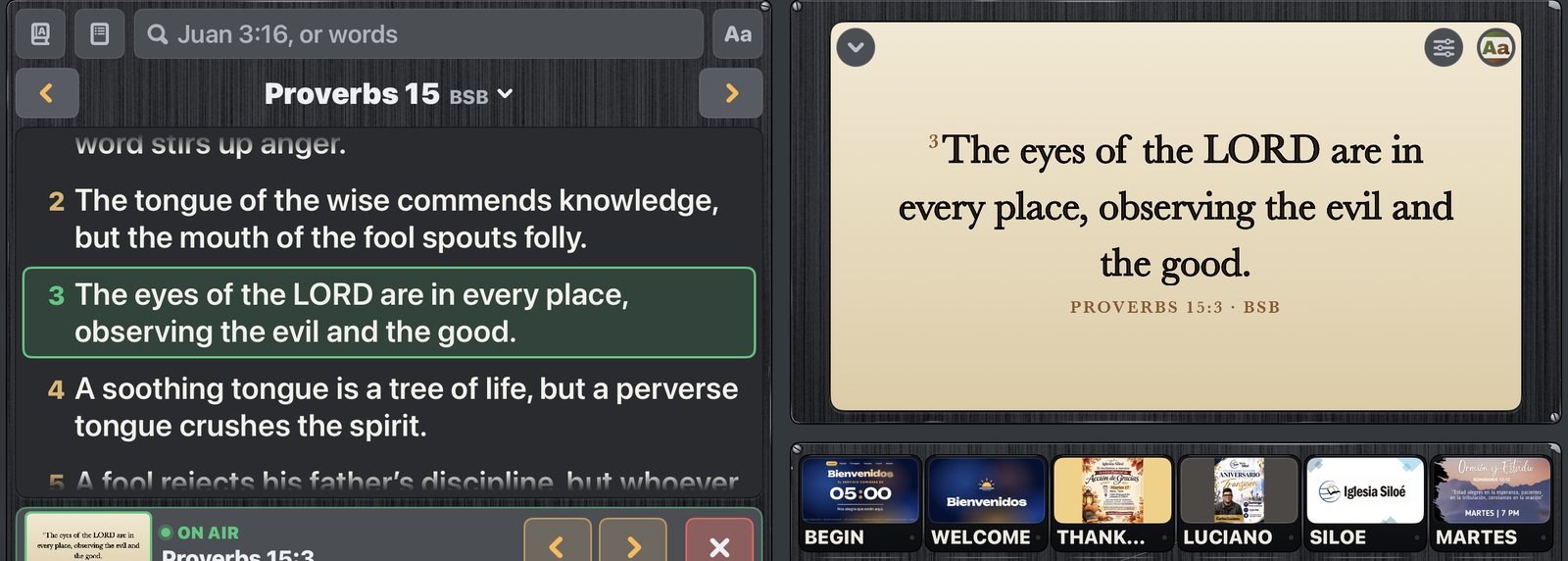
Put Scripture on the projector the moment it’s read. Type a reference — John 3:16, Juan 3:16, Psalm 23 — or tap a verse, and it’s on the screen; the arrows read on, verse by verse. Give a verse to a section of a song and it comes up when that section plays, and stays through a VAMP. Eight Bibles are built in, including King James, Reina-Valera 1909 and Palabra de Dios para ti.
The words on your audience’s phones.
Put a QR code on the screen, and anyone in the congregation can follow along on their own phone — no app, no account. They see the words being sung, big, in the language they choose, and the Bible verse when the pastor reads one. For someone who can’t see the screen well, or who sings in another language, it changes the service. On every plan. Off until you turn it on; the rig and the phones use the internet. Song lyrics shown on phones need a lyric licence, as projecting them does: the right way is your church’s CCLI Church Copyright License. Vessa Rig doesn’t check it; the licence is the church’s to keep.
When it’s just you.
Many leaders carry the whole service alone: tracks and click, a real mixer, vocal effects, harmony for your voice and instruments you can play, all on one iPad, with two inputs for your vocal and your guitar.
What your pastor will ask.
- What does it cost? The beta is free. At launch it’s by the year or once for life, and prices are announced then. If you ever stop paying, every song you have still plays. How the plans work.
- What does a bilingual service take? Lyrics in both languages. The vocals switch too when the song has a vocal stem for that language. Without one, the lyrics switch alone.
- Who’s behind it? Hector Miguel, a worship leader and music pastor, builds it full-time. There’s no account, and your songs stay on your devices and always export. His story.
Let the plan stay with the church.
Buy with your church’s own Apple Account, on the church’s iPad. App Store purchases belong to the account that makes them, so the plan stays with the church when the team changes.
Try it with your team.
Join the free beta, with every feature unlocked. Bring it to rehearsal, set up the extra screens and the backup, and see how your team feels before you use it in a service. VAMP, segues, the language switch, pictures per section, vocal effects, harmony, the full Vessa Keys library and the backup rig are in All Access. How the plans work.